# Notificar o cliente Situação Fiscal

<span style="font-size: 22.0pt; line-height: 107%;">Notificar o cliente pelo sistema de Acessorias</span>

<span style="font-size: 12.0pt; line-height: 107%;">Sexta-feira, 24 de janeiro de 2025</span>

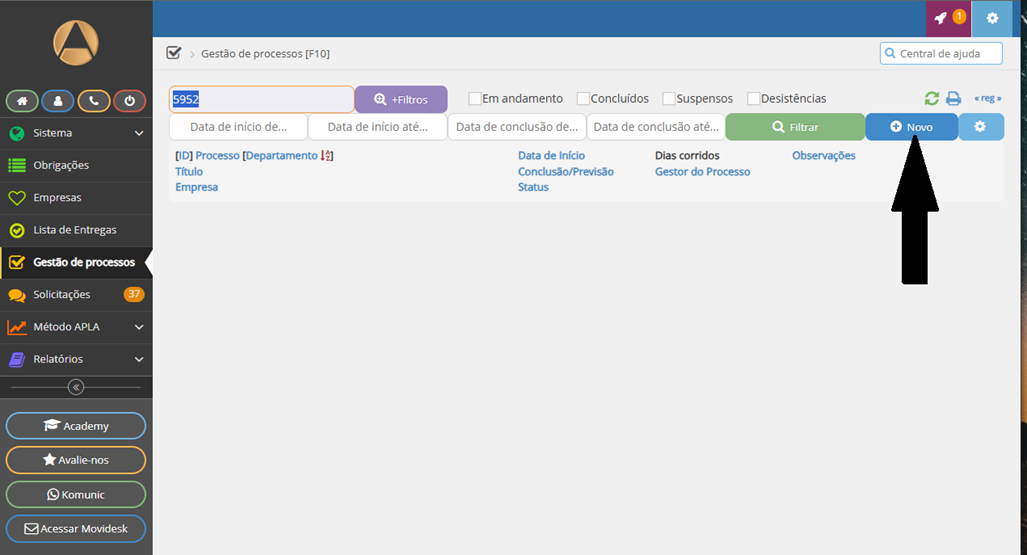
<span style="font-size: 14.0pt; line-height: 107%;">Casos em que essa solução é aplicável: situações fiscais com pendências que requerem ações específicas do cliente.</span>

<span style="font-size: 14.0pt; line-height: 107%; mso-no-proof: yes;">![](https://base.marinacontabil.com/uploads/images/gallery/2026-03/embedded-image-5bs9bosp.png)</span>

**<span style="font-size: 14.0pt; line-height: 107%;">Preencher as Informações:</span>**

<span style="font-size: 14.0pt; line-height: 107%; mso-bidi-font-family: Calibri; mso-bidi-theme-font: minor-latin;"><span style="mso-list: Ignore;">1.<span style="font: 7.0pt 'Times New Roman';"> </span></span></span>**<span style="font-size: 14.0pt; line-height: 107%;">Passo 01:</span>**<span style="font-size: 14.0pt; line-height: 107%;"> Selecione a opção "Notificar Cliente – Situação Fiscal".</span>

<span style="font-size: 14.0pt; line-height: 107%; mso-bidi-font-family: Calibri; mso-bidi-theme-font: minor-latin;"><span style="mso-list: Ignore;">2.<span style="font: 7.0pt 'Times New Roman';"> </span></span></span>**<span style="font-size: 14.0pt; line-height: 107%;">Passo 02:</span>**<span style="font-size: 14.0pt; line-height: 107%;"> Escolha a empresa que deseja notificar.</span>

<span style="font-size: 14.0pt; line-height: 107%; mso-bidi-font-family: Calibri; mso-bidi-theme-font: minor-latin;"><span style="mso-list: Ignore;">3.<span style="font: 7.0pt 'Times New Roman';"> </span></span></span>**<span style="font-size: 14.0pt; line-height: 107%;">Passo 03:</span>**<span style="font-size: 14.0pt; line-height: 107%;"> As informações relevantes aparecerão automaticamente.</span>

<span style="font-size: 14.0pt; line-height: 107%; mso-bidi-font-family: Calibri; mso-bidi-theme-font: minor-latin;"><span style="mso-list: Ignore;">4.<span style="font: 7.0pt 'Times New Roman';"> </span></span></span>**<span style="font-size: 14.0pt; line-height: 107%;">Passo 04:</span>**<span style="font-size: 14.0pt; line-height: 107%;"> O responsável pelo processo será, automaticamente, quem está abrindo a solicitação, ou seja, você.</span>

<span style="font-size: 22.0pt; line-height: 107%;">Notificar o cliente pelo sistema de Acessorias</span>

<span style="font-size: 12.0pt; line-height: 107%;">Sexta-feira, 24 de janeiro de 2025</span>

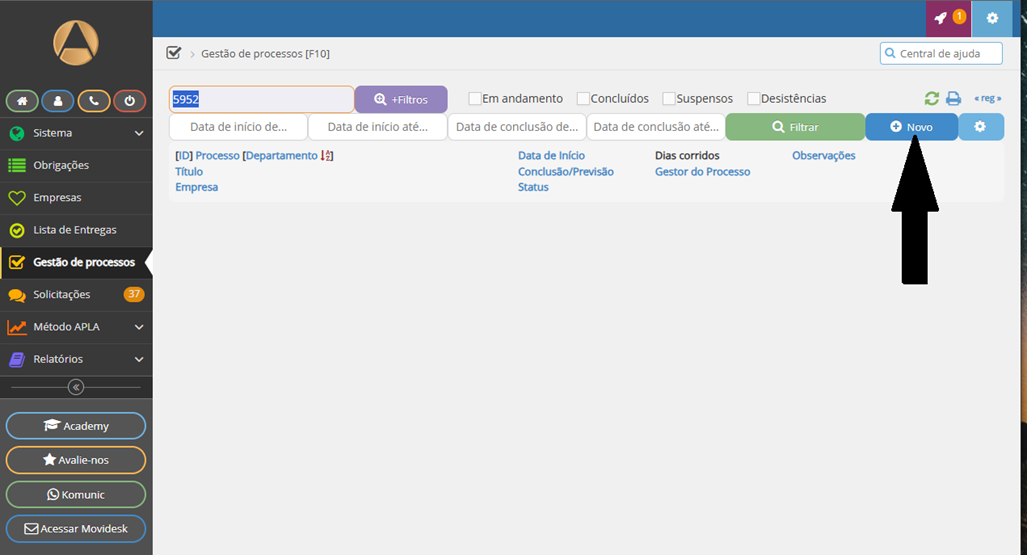
<span style="font-size: 14.0pt; line-height: 107%;">Casos em que essa solução é aplicável: situações fiscais com pendências que requerem ações específicas do cliente.</span>

<span style="font-size: 14.0pt; line-height: 107%; mso-no-proof: yes;">![](https://base.marinacontabil.com/uploads/images/gallery/2026-03/embedded-image-ykhtgpyo.png)</span>

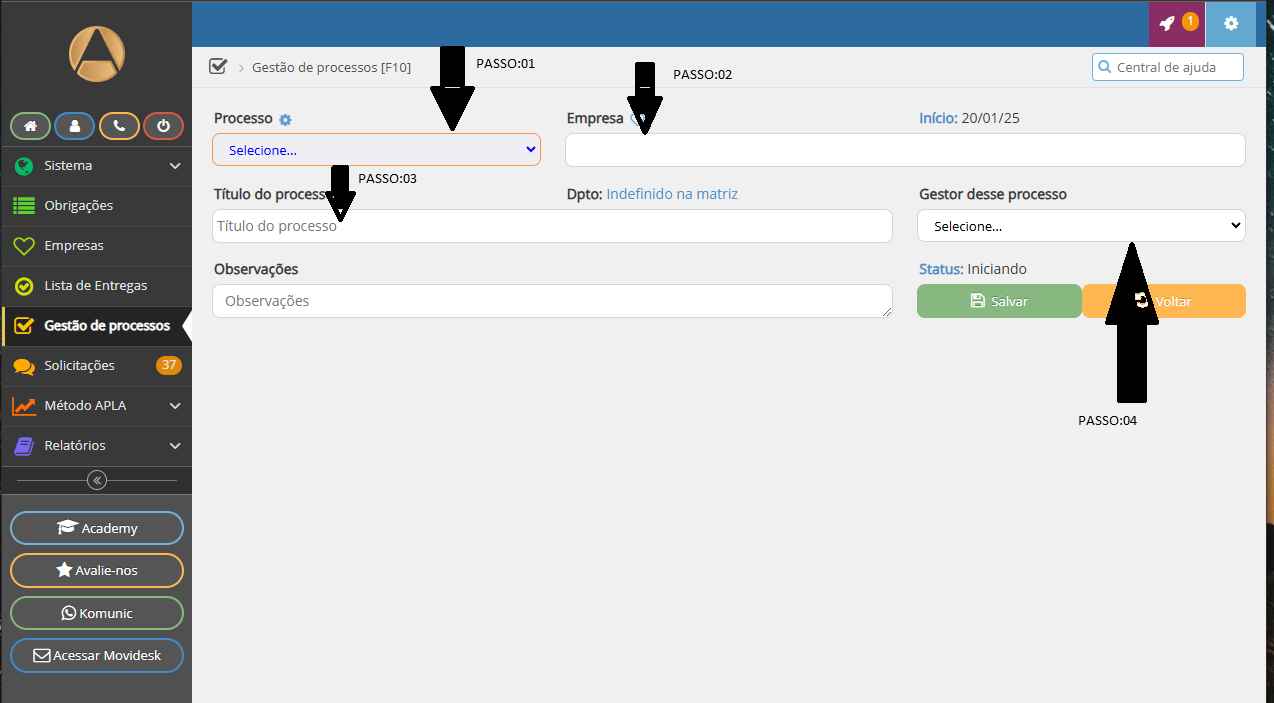
**<span style="font-size: 14.0pt; line-height: 107%;">Preencher as Informações:</span>**

<span style="font-size: 14.0pt; line-height: 107%; mso-bidi-font-family: Calibri; mso-bidi-theme-font: minor-latin;"><span style="mso-list: Ignore;">1.<span style="font: 7.0pt 'Times New Roman';"> </span></span></span>**<span style="font-size: 14.0pt; line-height: 107%;">Passo 01:</span>**<span style="font-size: 14.0pt; line-height: 107%;"> Selecione a opção "Notificar Cliente – Situação Fiscal".</span>

<span style="font-size: 14.0pt; line-height: 107%; mso-bidi-font-family: Calibri; mso-bidi-theme-font: minor-latin;"><span style="mso-list: Ignore;">2.<span style="font: 7.0pt 'Times New Roman';"> </span></span></span>**<span style="font-size: 14.0pt; line-height: 107%;">Passo 02:</span>**<span style="font-size: 14.0pt; line-height: 107%;"> Escolha a empresa que deseja notificar.</span>

<span style="font-size: 14.0pt; line-height: 107%; mso-bidi-font-family: Calibri; mso-bidi-theme-font: minor-latin;"><span style="mso-list: Ignore;">3.<span style="font: 7.0pt 'Times New Roman';"> </span></span></span>**<span style="font-size: 14.0pt; line-height: 107%;">Passo 03:</span>**<span style="font-size: 14.0pt; line-height: 107%;"> As informações relevantes aparecerão automaticamente.</span>

<span style="font-size: 14.0pt; line-height: 107%; mso-bidi-font-family: Calibri; mso-bidi-theme-font: minor-latin;"><span style="mso-list: Ignore;">4.<span style="font: 7.0pt 'Times New Roman';"> </span></span></span>**<span style="font-size: 14.0pt; line-height: 107%;">Passo 04:</span>**<span style="font-size: 14.0pt; line-height: 107%;"> O responsável pelo processo será, automaticamente, quem está abrindo a solicitação, ou seja, você.</span>

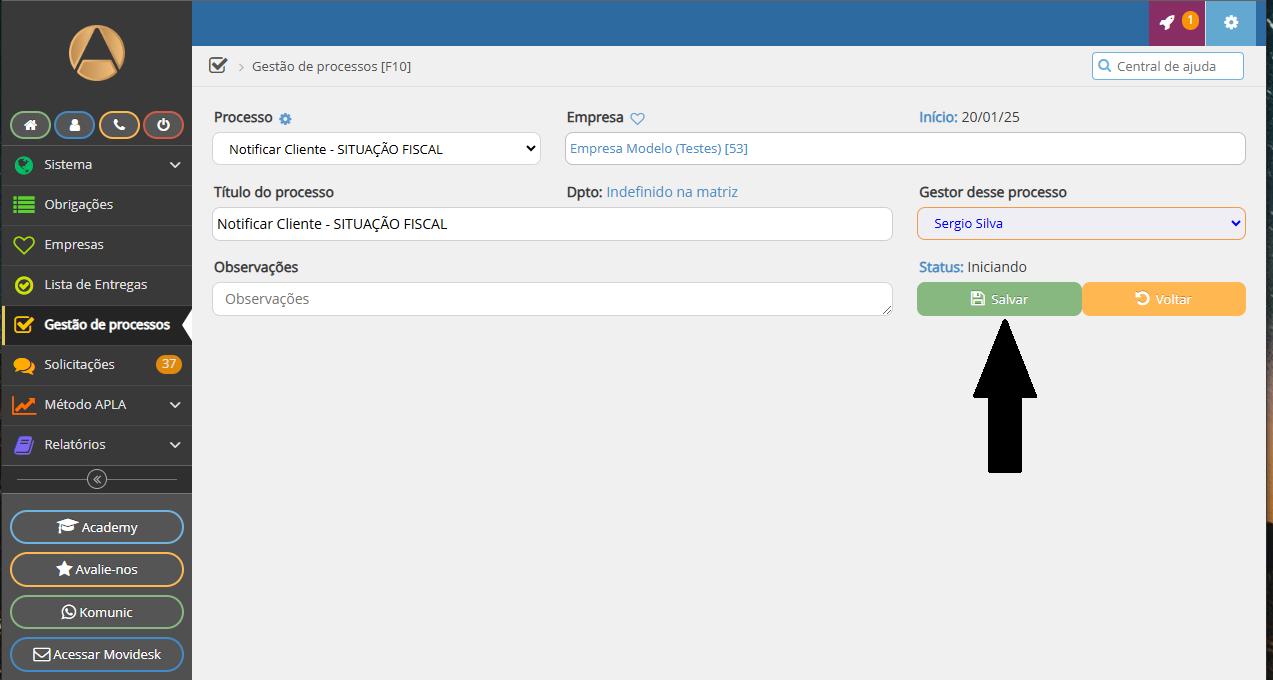
[![01.png](https://base.marinacontabil.com/uploads/images/gallery/2026-03/scaled-1680-/01.png)](https://base.marinacontabil.com/uploads/images/gallery/2026-03/01.png)<span style="font-size: 14.0pt; line-height: 107%;"> </span>

<span style="font-size: 14.0pt; line-height: 107%;">- Salvar</span>

<span style="font-size: 14.0pt; line-height: 107%;"> </span>

[![02.png](https://base.marinacontabil.com/uploads/images/gallery/2026-03/scaled-1680-/02.png)](https://base.marinacontabil.com/uploads/images/gallery/2026-03/02.png)

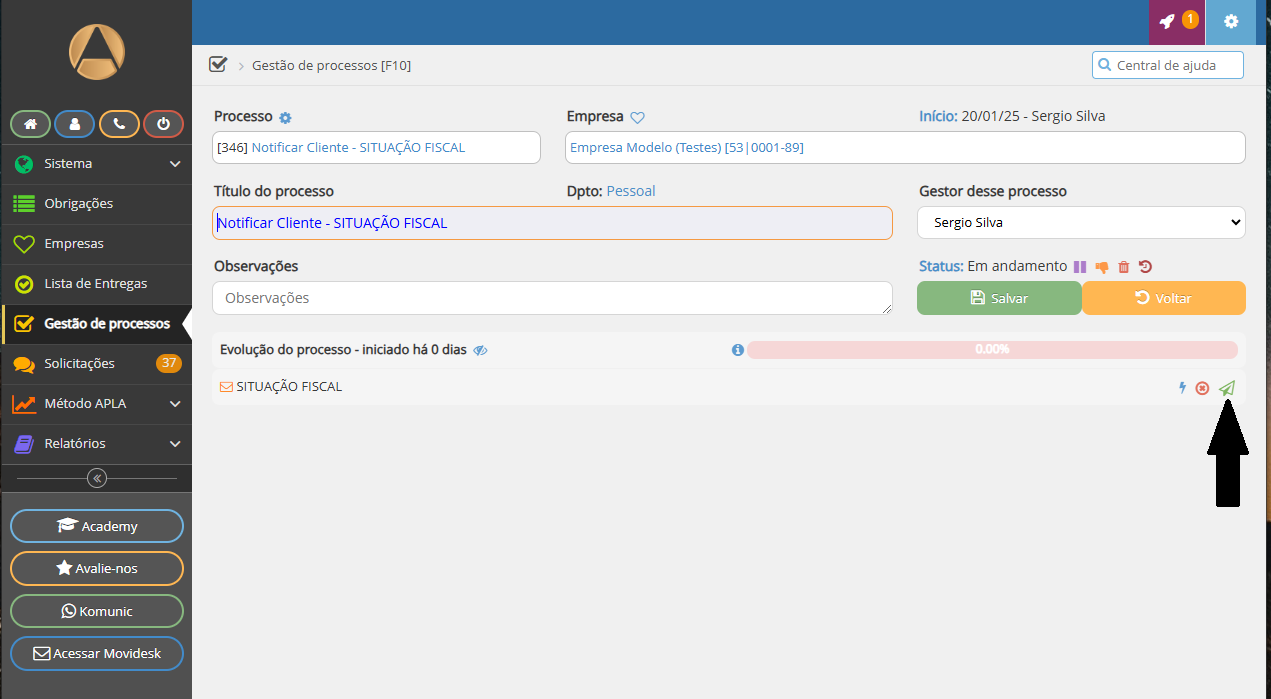
<span style="font-size: 14.0pt; line-height: 107%;">Após salvar, a próxima tela será exibida. Clique no ícone destacado.</span>

[![03.png](https://base.marinacontabil.com/uploads/images/gallery/2026-03/scaled-1680-/03.png)](https://base.marinacontabil.com/uploads/images/gallery/2026-03/03.png)

<span style="font-size: 14.0pt; line-height: 107%;"> </span>

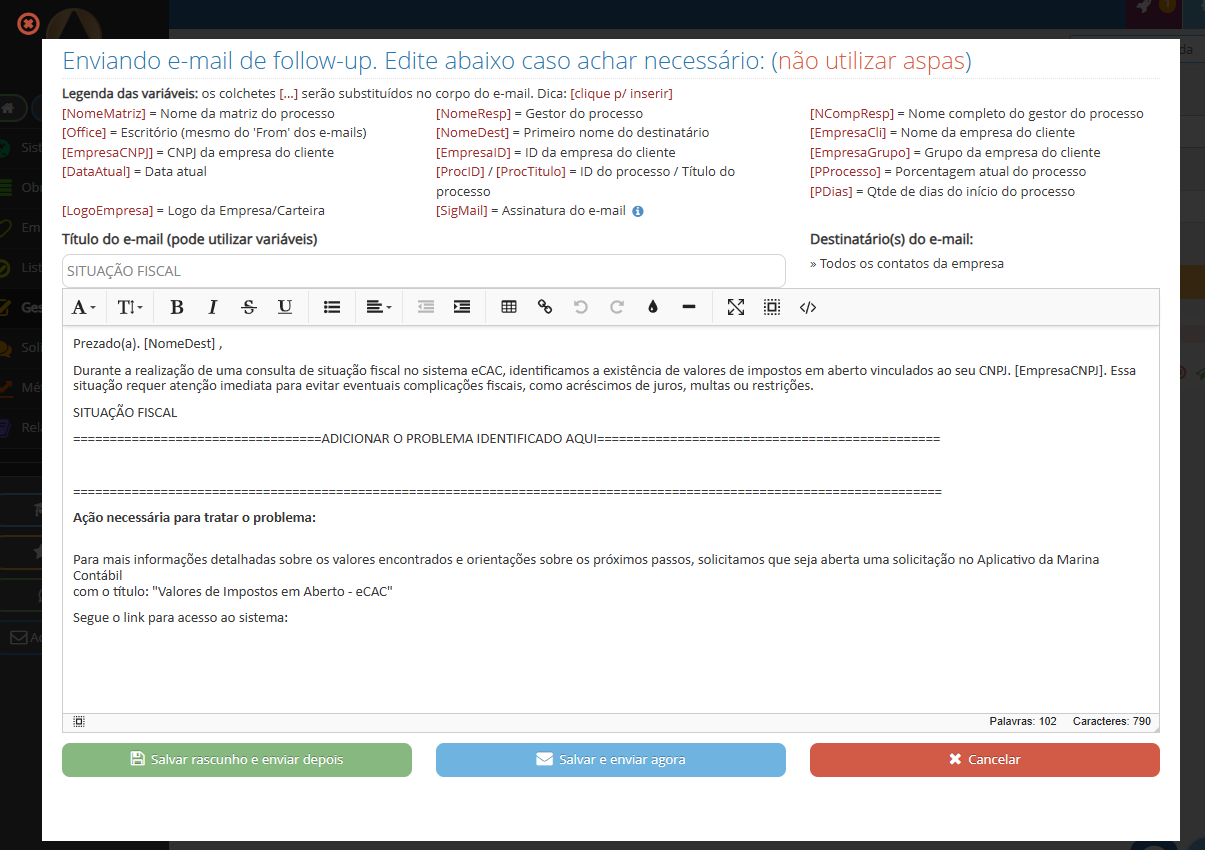
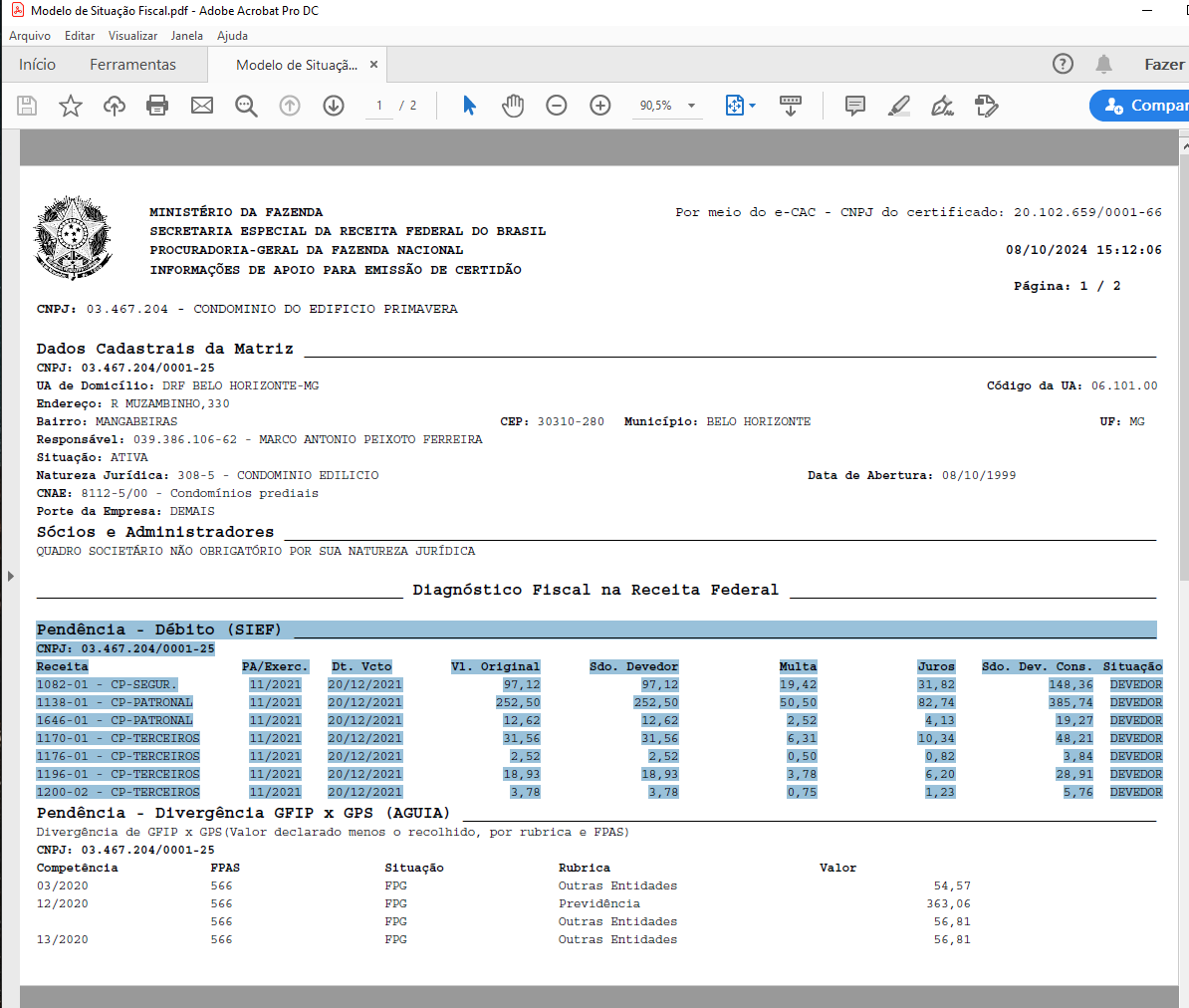
<span style="font-size: 14.0pt; line-height: 107%;">Neste momento, abra a situação fiscal, copie o conteúdo que deseja notificar ao cliente e cole no local indicado. Lembre-se de que o conteúdo pode apresentar problemas de formatação; ajuste-o para garantir uma melhor visualização ao cliente.</span>

<span style="font-size: 14.0pt; line-height: 107%;">Apague as linhas pontilhadas, pois elas servem apenas como indicação do local onde o conteúdo deve ser colado.</span>

<span style="font-size: 14.0pt; line-height: 107%;"> </span>

[![04.png](https://base.marinacontabil.com/uploads/images/gallery/2026-03/scaled-1680-/04.png)](https://base.marinacontabil.com/uploads/images/gallery/2026-03/04.png)

<span style="font-size: 14.0pt; line-height: 107%;"> </span>

<span style="font-size: 14.0pt; line-height: 107%;"> </span>

<span style="font-size: 14.0pt; line-height: 107%;"> </span><span style="font-size: 14.0pt; line-height: 107%;"> </span>

**<u><span style="font-size: 14.0pt; line-height: 107%;">Exemplo de conteúdo.</span></u>**

<span style="font-size: 14.0pt; line-height: 107%;"> </span>

[![06.png](https://base.marinacontabil.com/uploads/images/gallery/2026-03/scaled-1680-/06.png)](https://base.marinacontabil.com/uploads/images/gallery/2026-03/06.png)

<span style="font-size: 14.0pt; line-height: 107%;"> </span>

<span style="font-size: 14.0pt; line-height: 107%;"> </span>

<span style="font-size: 14.0pt; line-height: 107%;"> Copie para o chat GPT</span>

[https://chatgpt.com/](https://chatgpt.com/ "https://chatgpt.com/")

<span style="font-size: 14.0pt; line-height: 107%;"> e envie esse prompt "Formate esse texto"</span>

<span style="font-size: 14.0pt; line-height: 107%;"> </span>

<span style="font-size: 14.0pt; line-height: 107%;"> Depois de formatado cole o conteudo no e-mail que o sistema avai enviar ao cliente.</span>

<span style="font-size: 14.0pt; line-height: 107%;"> </span>

<span style="font-size: 14.0pt; line-height: 107%;"> </span>

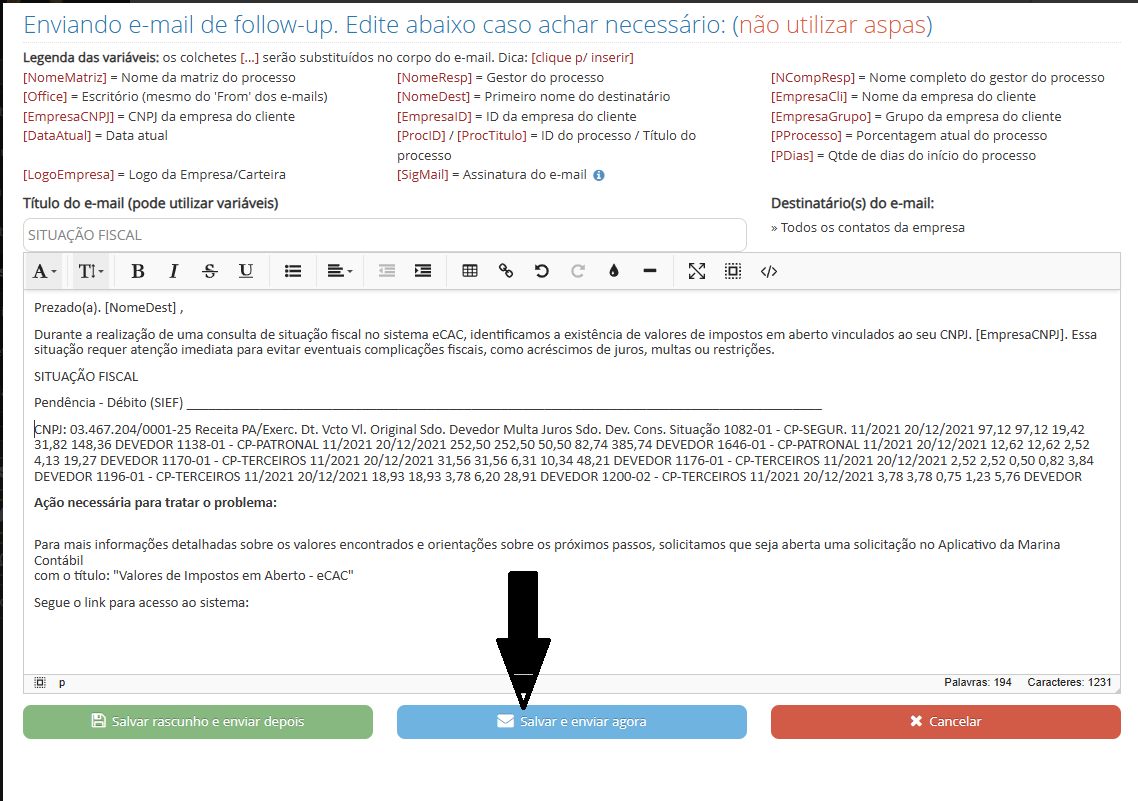
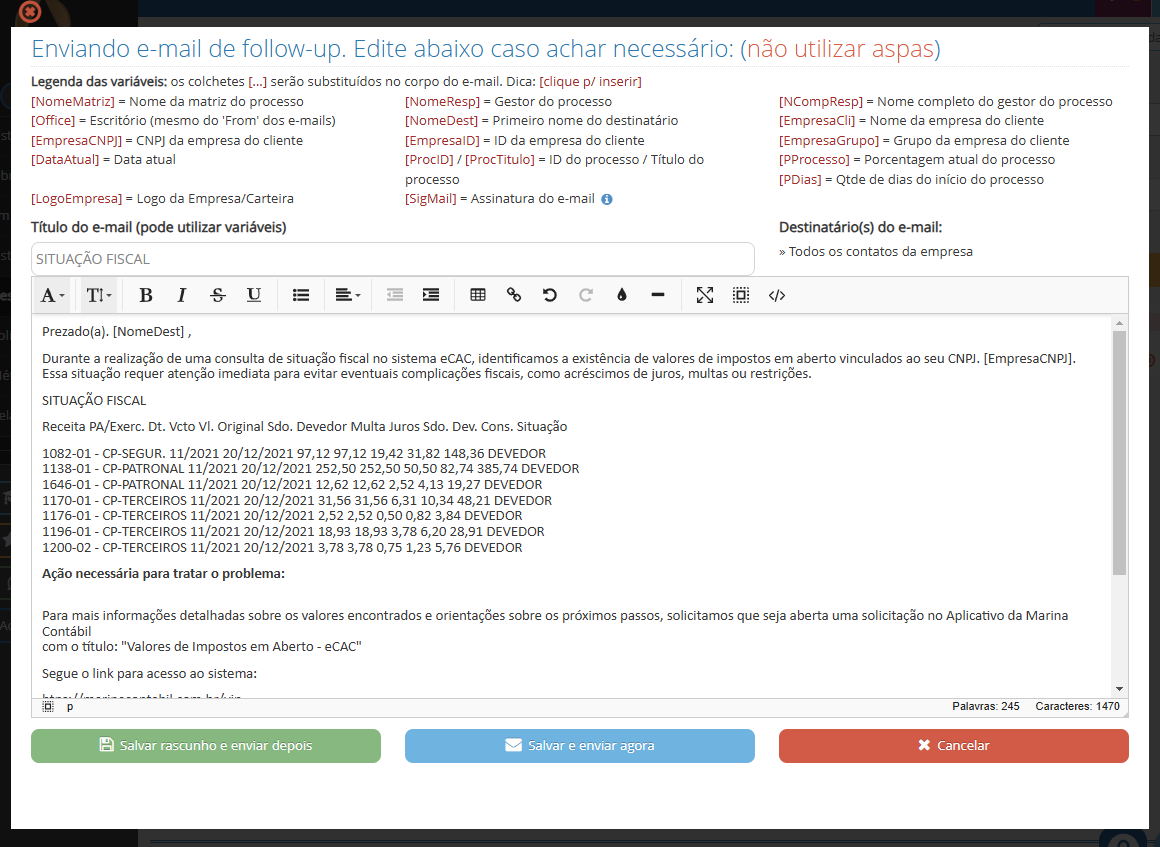
<span style="font-size: 14.0pt; line-height: 107%;">[![07.png](https://base.marinacontabil.com/uploads/images/gallery/2026-03/scaled-1680-/07.png)](https://base.marinacontabil.com/uploads/images/gallery/2026-03/07.png)Após colar o conteúdo desejado, ele ficará com uma aparência semelhante à mostrada na imagem abaixo. Certifique-se de formatá-lo adequadamente para torná-lo mais apresentável ao cliente.</span>

<span style="font-size: 14.0pt; line-height: 107%;"> </span>

<span style="font-size: 14.0pt; line-height: 107%;"> </span><span style="font-size: 14.0pt; line-height: 107%;"> </span>

<span style="font-size: 14.0pt; line-height: 107%;">Após a formatação, o conteúdo deve ficar semelhante ao exemplo mostrado na imagem abaixo.</span>

<span style="font-size: 14.0pt; line-height: 107%;">Clique em **<span style="color: red;">Salvar e Enviar Agora</span>**<span style="color: red;"> </span>para concluir o processo.</span>

[![05-1.png](https://base.marinacontabil.com/uploads/images/gallery/2026-03/scaled-1680-/05-1.png)](https://base.marinacontabil.com/uploads/images/gallery/2026-03/05-1.png)

<span style="font-size: 14.0pt; line-height: 107%;"> </span>

<span style="font-size: 14.0pt; line-height: 107%;"> </span>

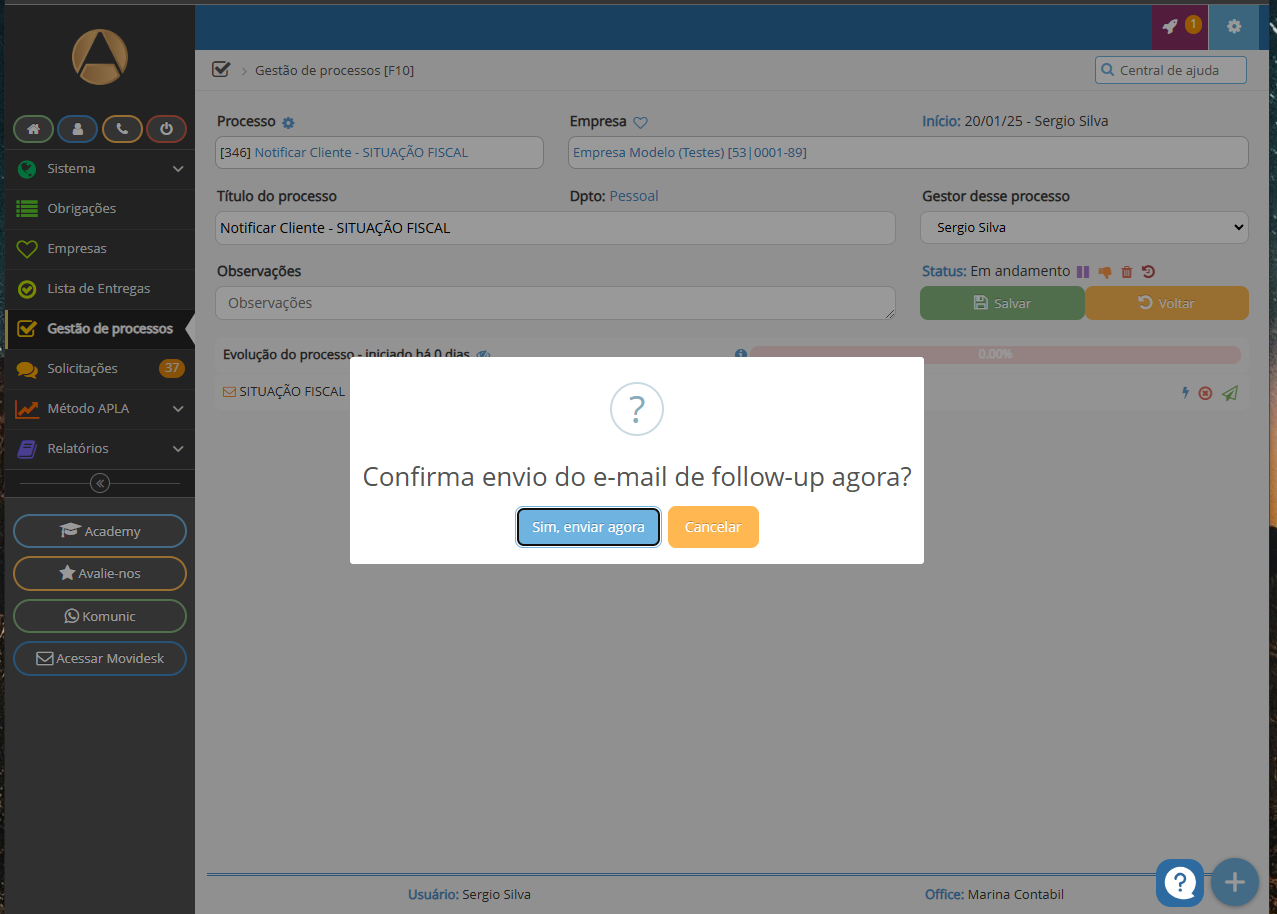
<span style="font-size: 14.0pt; line-height: 107%;">Clique em **<span style="color: red;">Sim, Enviar Agora</span>**<span style="color: red;"> </span>para confirmar, e o processo estará concluído.</span>

[![08.png](https://base.marinacontabil.com/uploads/images/gallery/2026-03/scaled-1680-/08.png)](https://base.marinacontabil.com/uploads/images/gallery/2026-03/08.png)

<span style="font-size: 14.0pt; line-height: 107%;"> </span>

<span style="font-size: 14.0pt; line-height: 107%;"> </span><span style="font-size: 14.0pt; line-height: 107%;"> </span><span style="font-size: 14.0pt; line-height: 107%;"> </span>

<span style="font-size: 14.0pt; line-height: 107%;">Esse processo garante que o cliente seja devidamente notificado sobre a pendência na situação fiscal. Caso seja necessário, é possível comprovar que a notificação foi enviada ao cliente acessando o prontuário da empresa, onde constam informações como a data de envio, o responsável pelo envio, o destinatário e até mesmo as datas em que o cliente leu o e-mail. Essas informações são fundamentais para assegurar a conformidade com nossas políticas internas.</span>

<span style="font-size: 14.0pt; line-height: 107%;">Outro ponto importante é que, ao emitir uma nova situação fiscal, o setor **Fiscal** deve sempre consultar o prontuário da empresa para verificar se a notificação já foi tratada. Caso positivo, o fiscal não deve abrir uma nova solicitação, pois o cliente já está ciente da situação e, por algum motivo, optou por não resolver o problema.</span>

<span style="font-size: 14.0pt; line-height: 107%;"> </span>

<span style="font-size: 14.0pt; line-height: 107%;"> </span>

<span style="font-size: 14.0pt; line-height: 107%;"> </span><span style="font-size: 14.0pt; line-height: 107%;"></span>